 MaxArts Lab
Cost
Materials, people, equipment, subcontractors, overheads. What everything costs in each area.
Business digitization means one system instead of spreadsheets and chats: money, projects, stock and people in one place, with AI built in. A business map in one week, a launch in one area in 2–4 weeks, and the price is fixed before each step.
Modules
Finance
Projects
Warehouse
Sales
Team
One system
online
Profit by project
+13,4 %
Revenue
$1.24MCost
$1.08MAI agent
Project #3 is 4 days behind. I suggest moving a crew there.
How much are you making on an order or project while it is still running?
Where are you off plan today, on time and on money?
What has the client accepted, what has been invoiced and what has been paid?
What are your people and equipment busy with this week?
How do employees use AI, and do they check the result?
Materials, people, equipment, subcontractors, overheads. What everything costs in each area.
Works, products, services, goods. Contract, volume, deadline, price, what has been accepted and paid.
Profit, variance from plan, staff workload, inventory turnover, receivables and payables.
Module names change, the logic does not. That is why the system can be assembled from ready-made parts instead of being written from scratch.
This is how our Build OS works: proven in construction and installation in Russia and Bali.
This is how our switchboard production works: specification → purchasing → assembly → testing.
We have no rollouts of our own in trade yet: the logic is the same, and we rename the modules at step 1.
We have no rollouts of our own in services yet: the logic is the same, and we rename the modules at step 1.
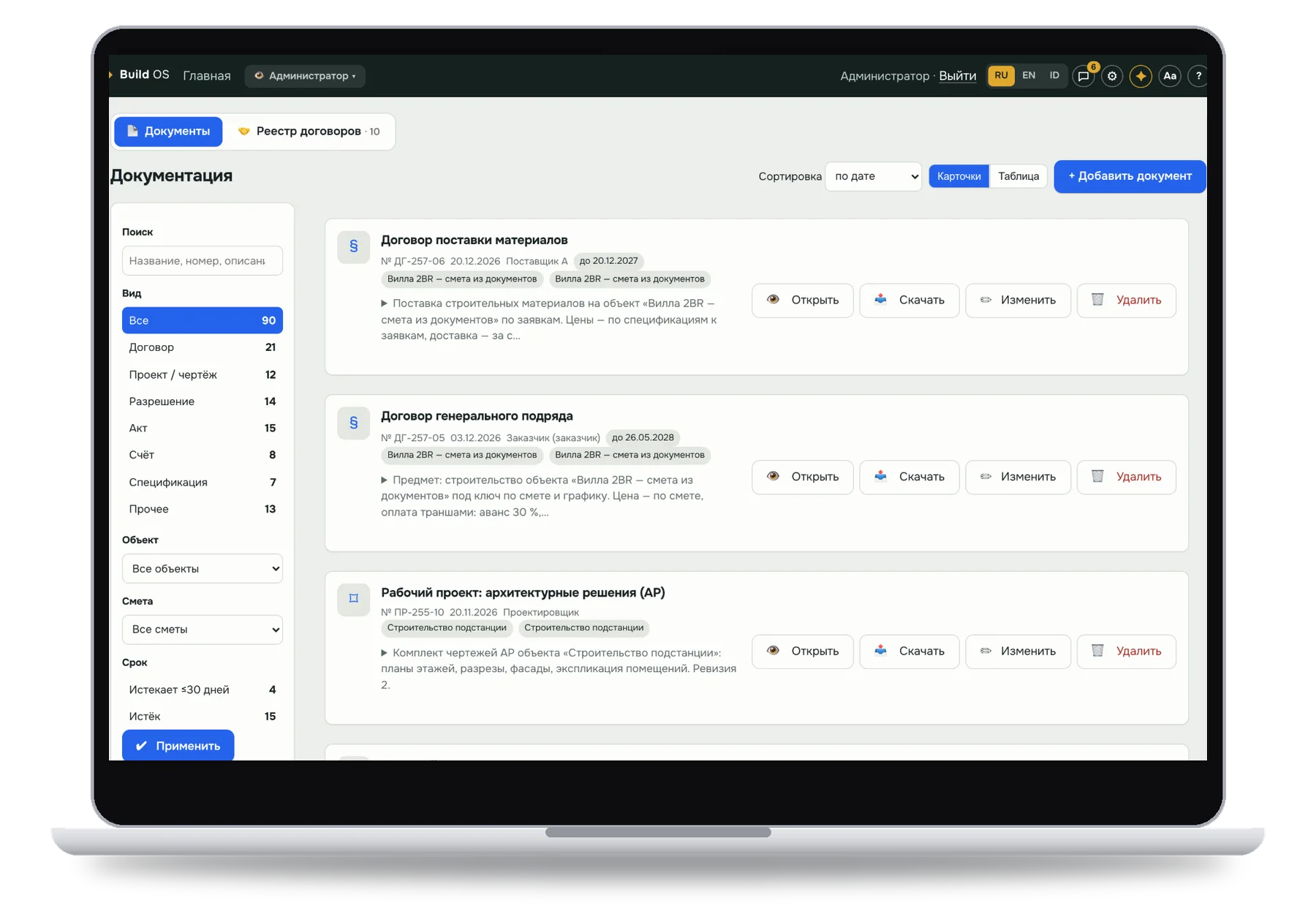
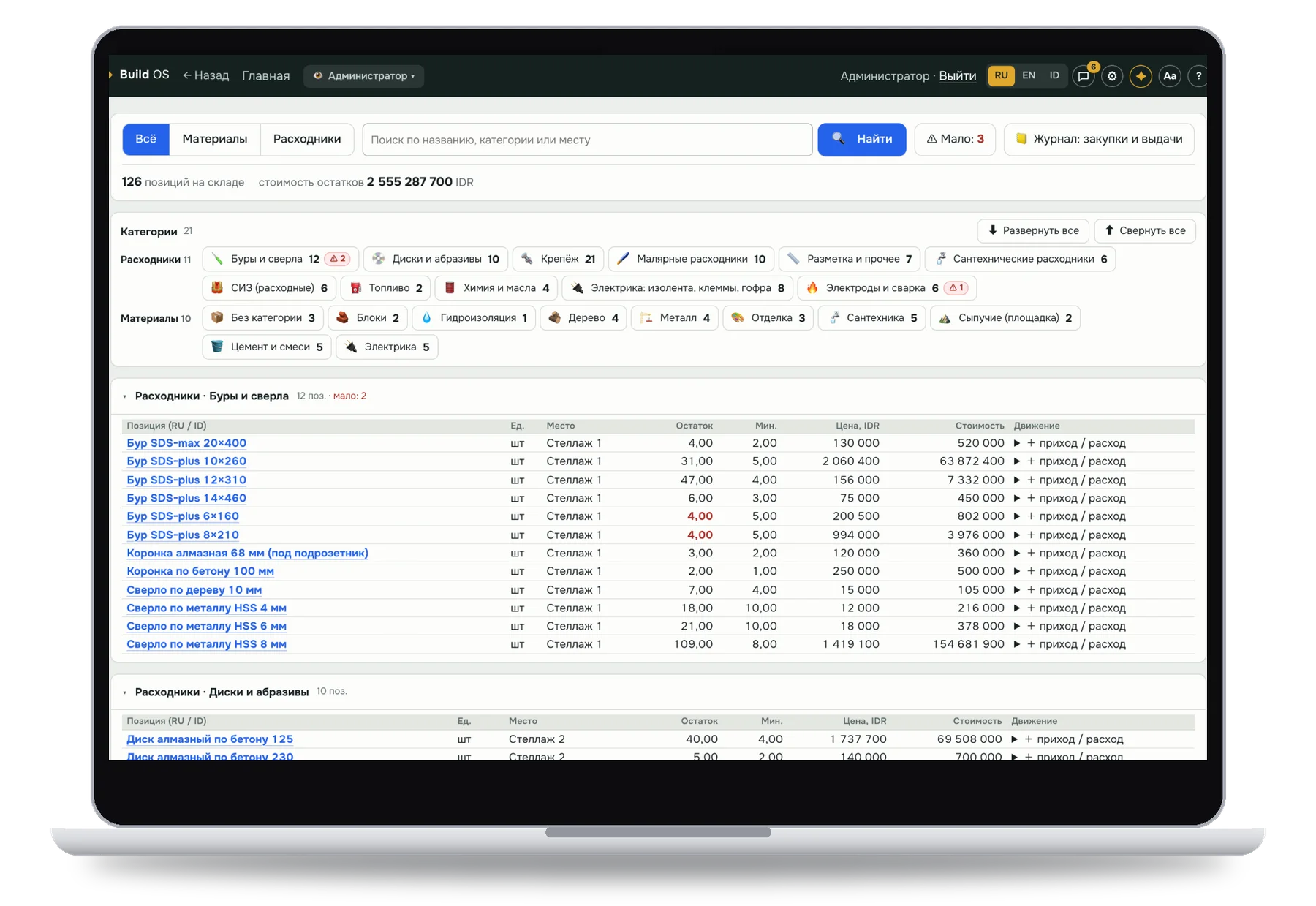
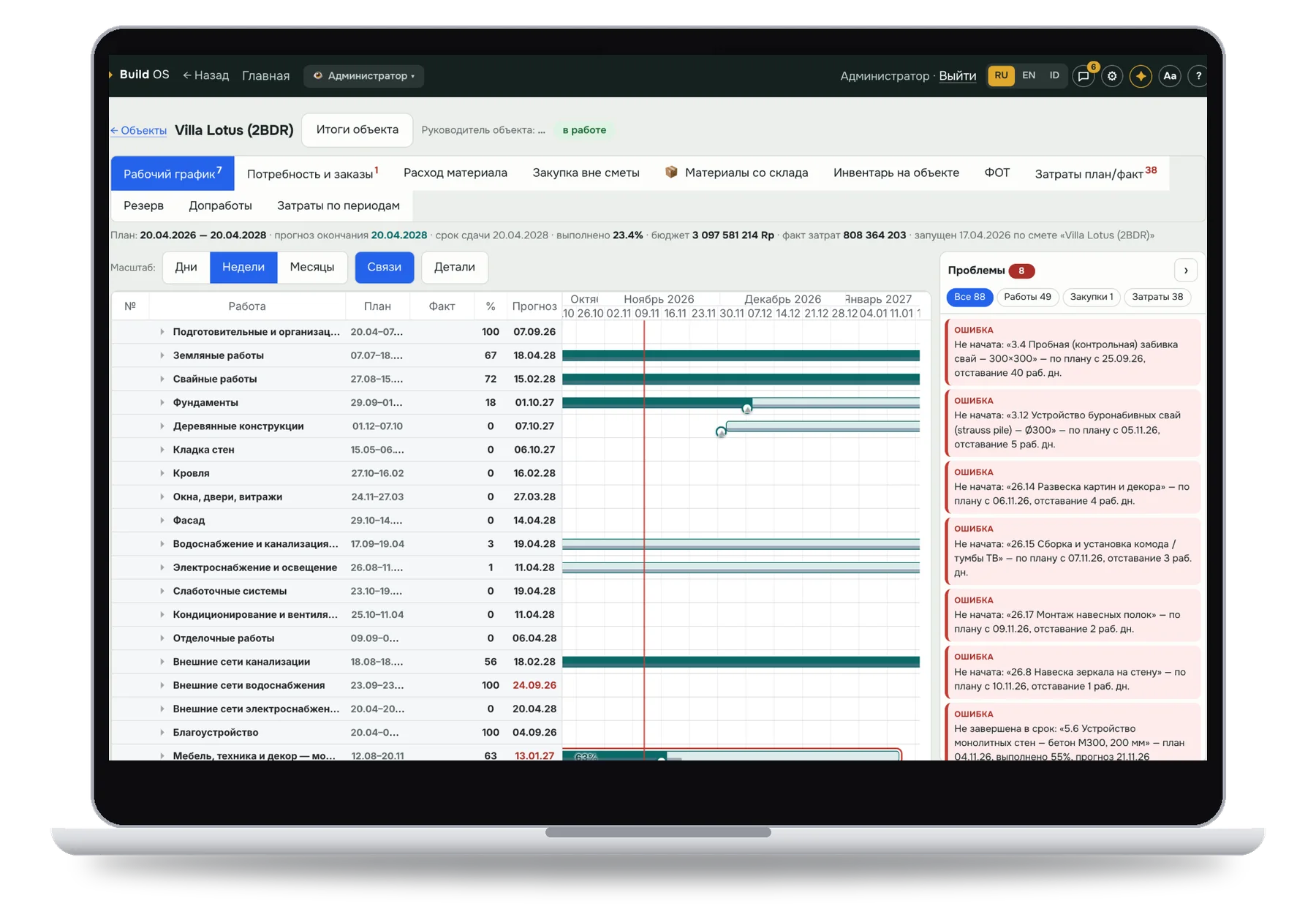
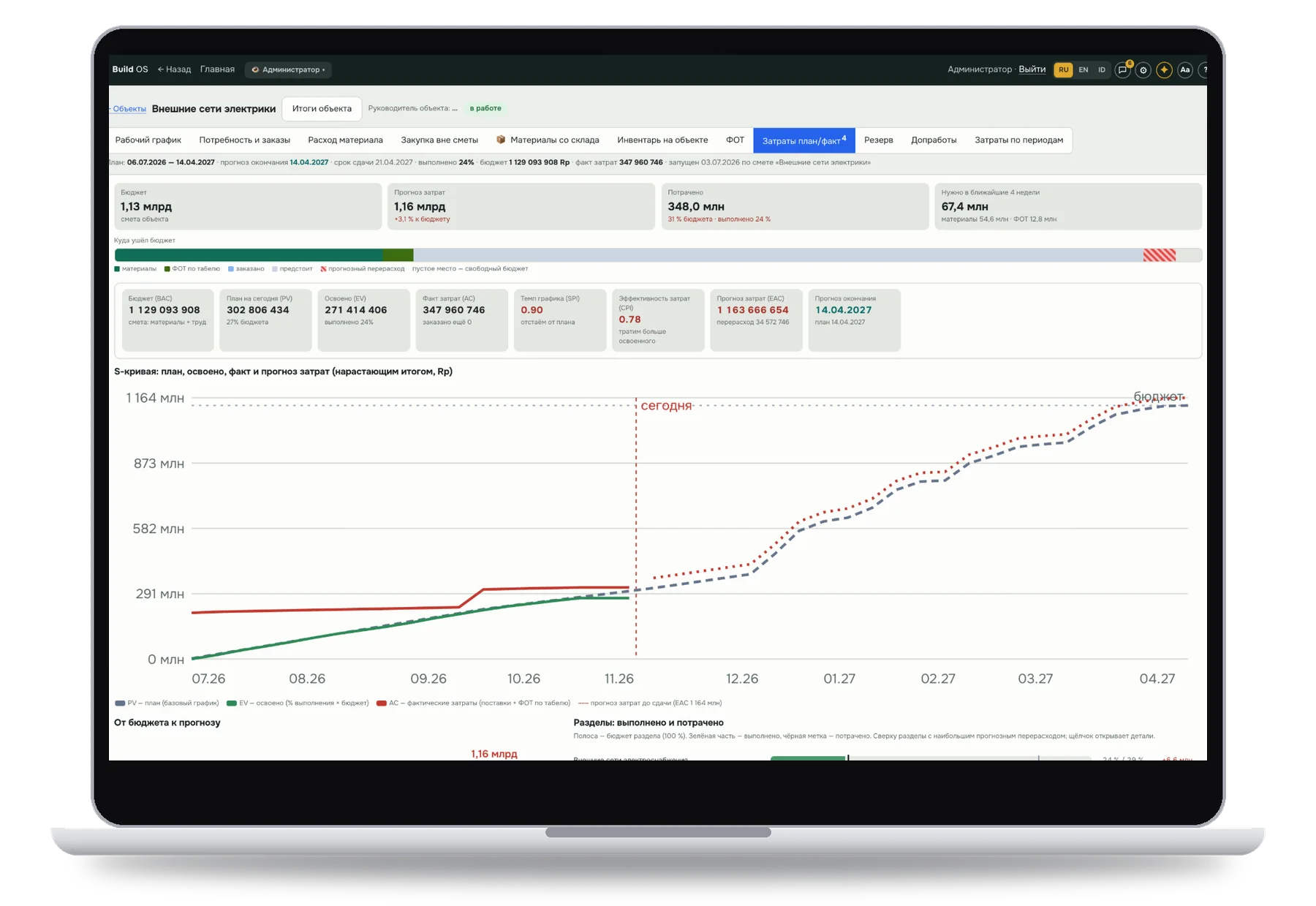
Every document is linked to a project and its estimate. The system tracks contract and permit deadlines on its own.
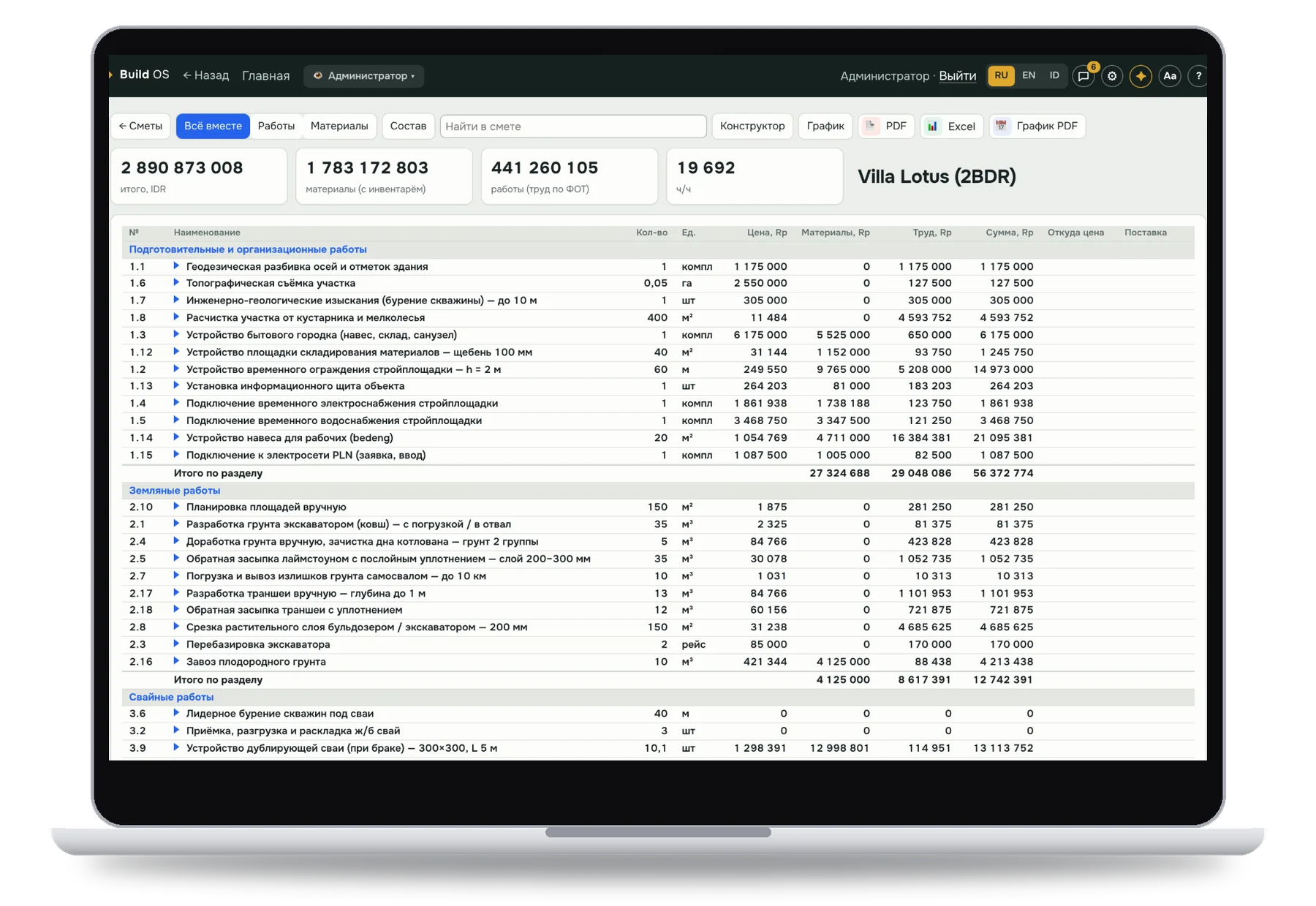
Nothing gets lostMaterials, labor and man-hours are calculated at once. Every price has a source and a date.
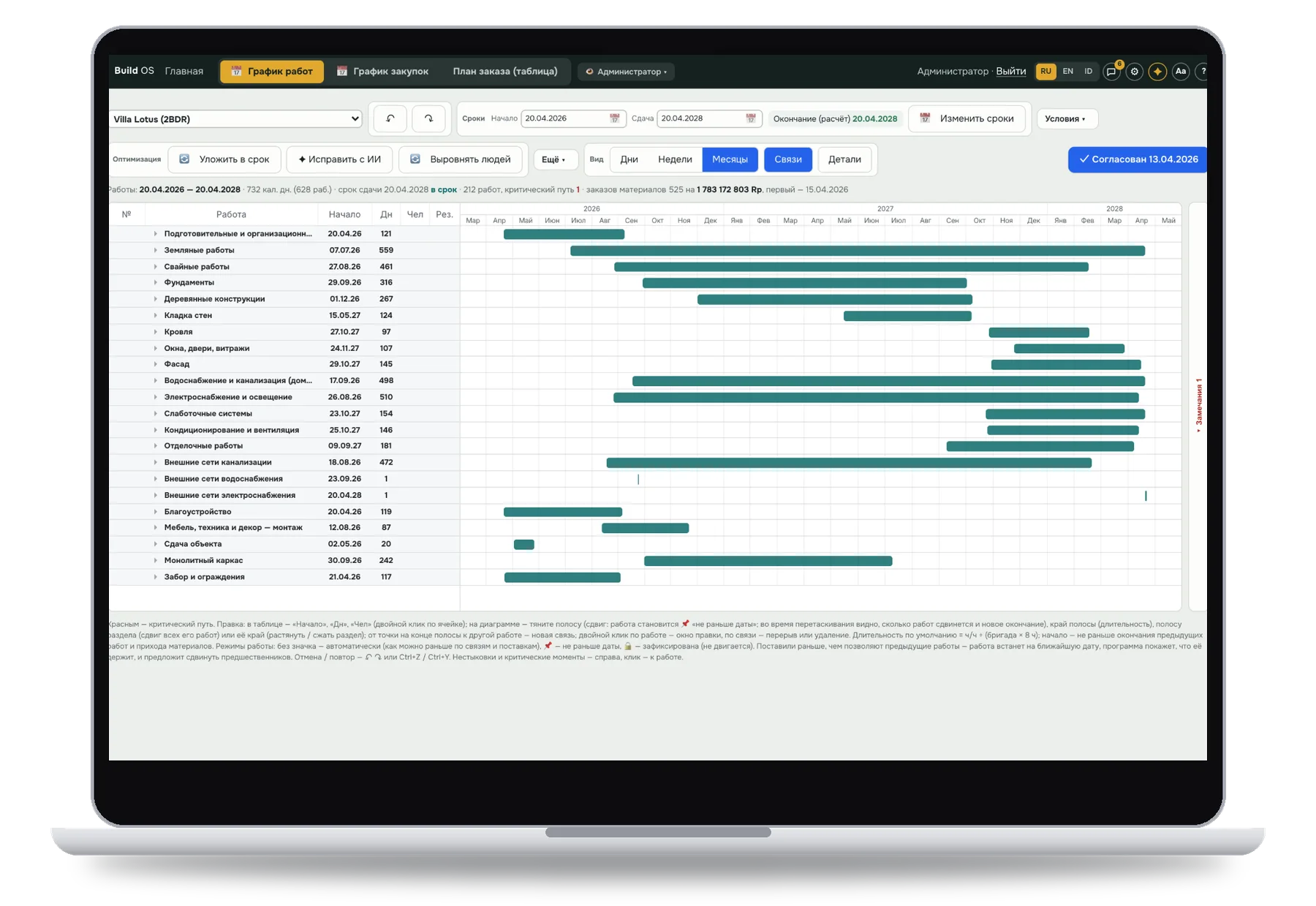
Every price has a sourceWorks, deadlines and the critical path. Material orders are tied to work dates, and AI helps you stay on time.
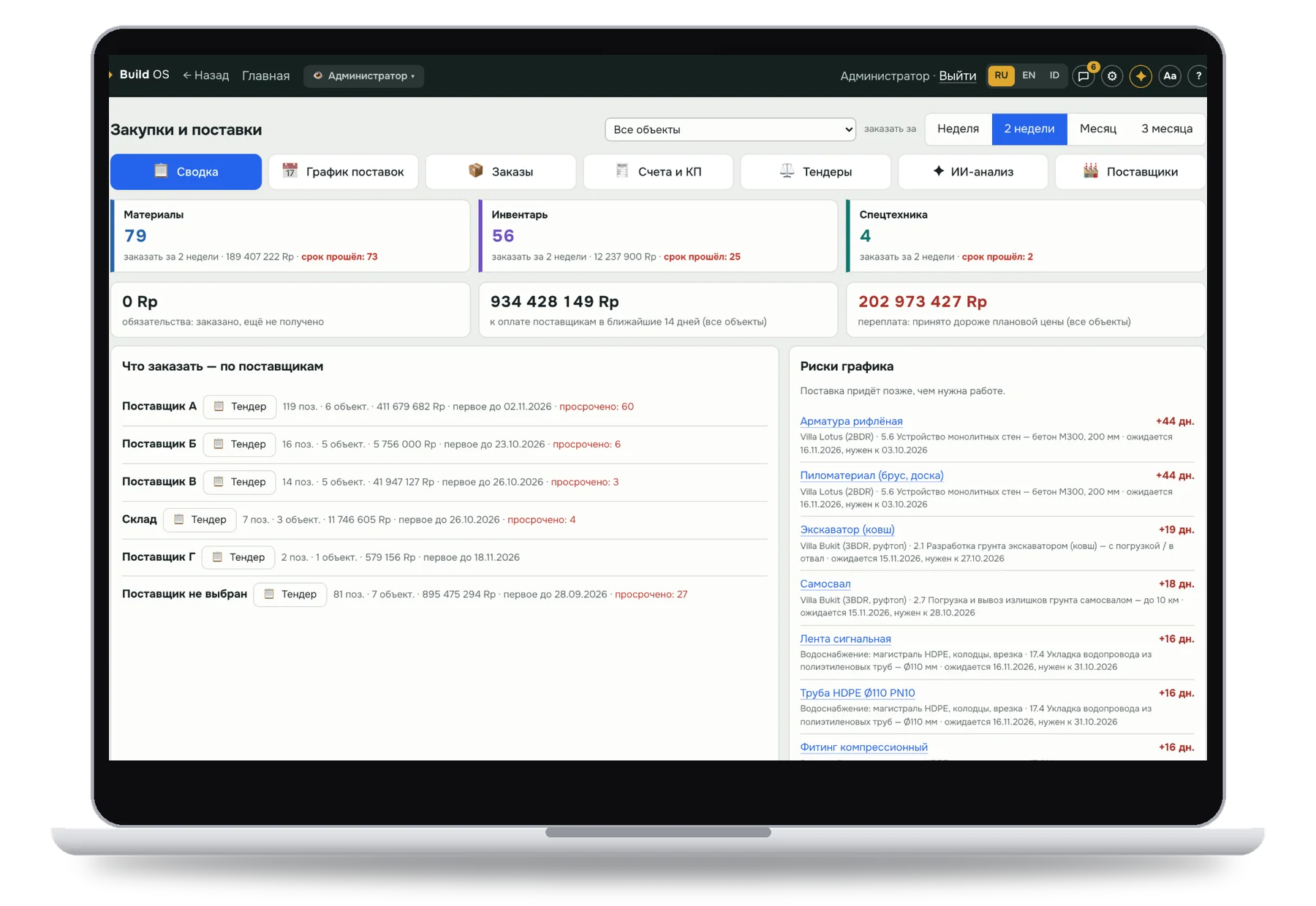
Deadlines visible in advanceDemand comes from the schedule. The system groups items by supplier and warns about delays.
Ordered in time for the workThe warehouse knows what arrived on site and what was issued to the crew. Items below minimum are highlighted.
Issued against requestsActuals land on the schedule, delays show up at once, and issues are collected in a separate list.
Actuals the same dayBudget, forecast and variance for every project, while there is still time to change something.
Variance visible in advanceManufacturing has the same chain: order → process sheet → purchasing → workshop → warehouse → cost. The data on screen is for demonstration.
Goes through the drawing set sheet by sheet: plans, diagrams, specifications. Takes off dimensions and quantities.
Discrepancies between sections, the specification and the plan. Drafts questions for the client.
Items come only from the company’s works and price database, and every price has a supplier and a date.
Questionable items are flagged, and a person makes the call.
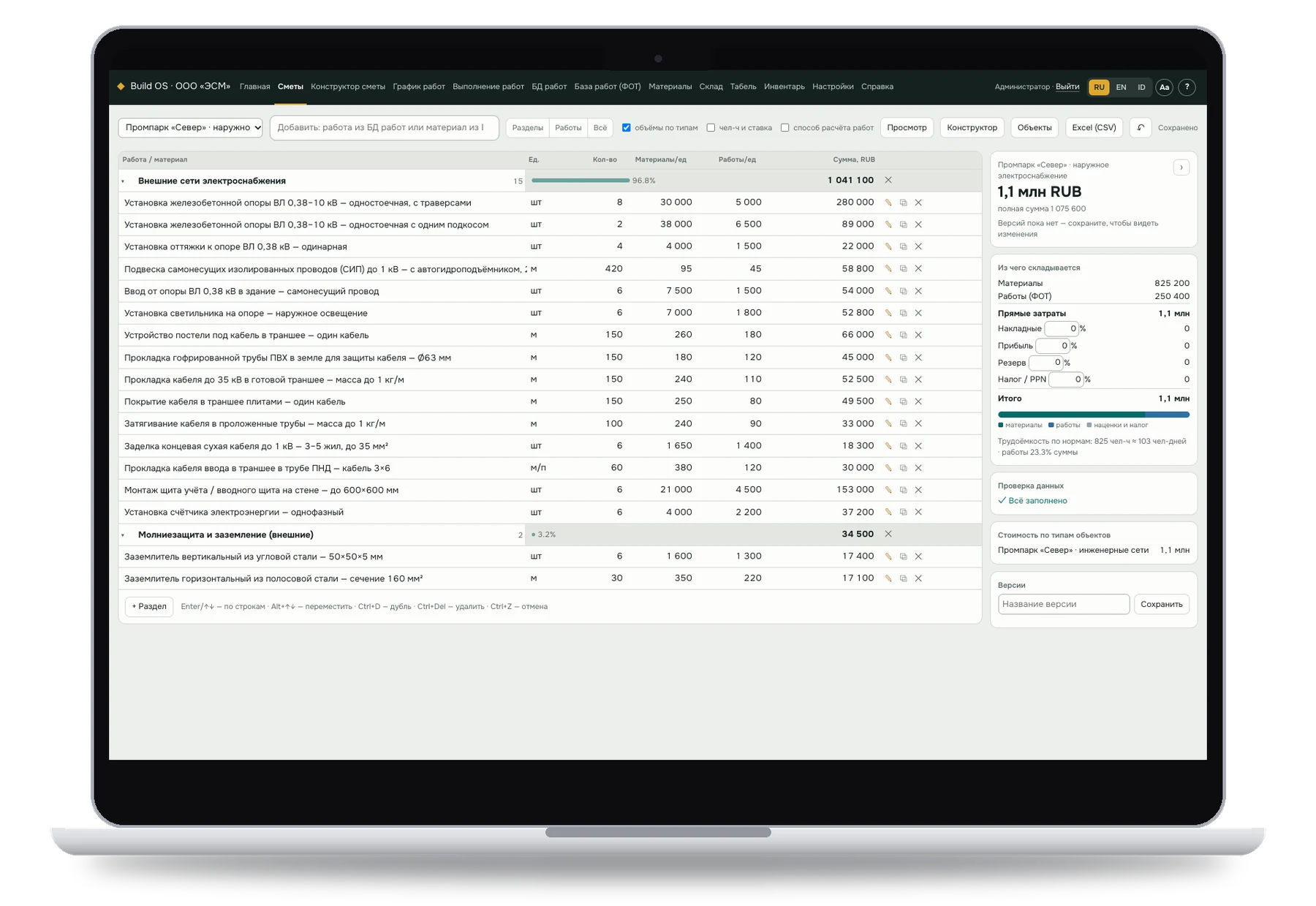
In manufacturing, AI reads the drawing and the request and builds the specification and quote from your catalogue.
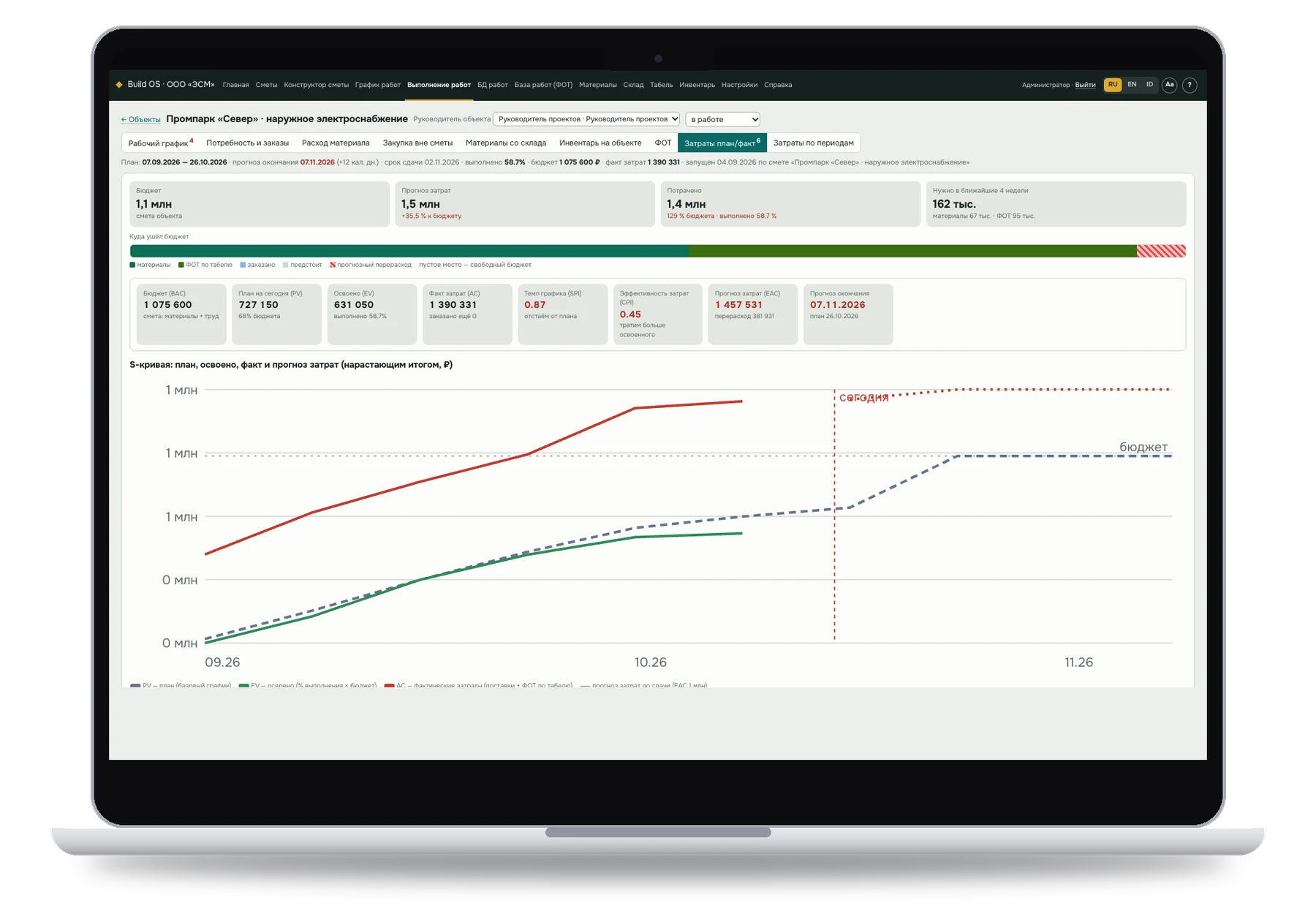
Materials, crews, equipment, engineering staff and overheads in one structure.
Contract value, work done and accepted, extra works, what to invoice the client.
A deadline at risk, a pending decision, a question from site turned into a task with an owner.
Manufacturing and trade get the same screens, with an order, batch or store instead of a project. The data on screen is for demonstration.
Check the electrical specification against the diagram and the supplier invoice. What doesn’t match?
Three discrepancies:
The email to the supplier is ready in the project files
Employees work with AI inside their own system, with the company’s projects, documents and estimates at hand.
Workspaces, files and archive on your own server instead of personal subscriptions.
Claude, GPT. Russian models such as GigaChat and YandexGPT can also be connected.
Standards, typical solutions, company price lists.
of chats where the AI result was checked.
Three months ago it was about 20%
Two models score independently: clear goal, context, iteration, checking. Nobody reads the conversations.
This is a reason to train, not to punish: show people how to check results, and find a first task for those who don’t use it.
AI workspace analytics screen. Roles instead of names, demonstration figures.
A different country, villas and restaurants instead of factories. The logic is the same: cost, revenue, metrics.
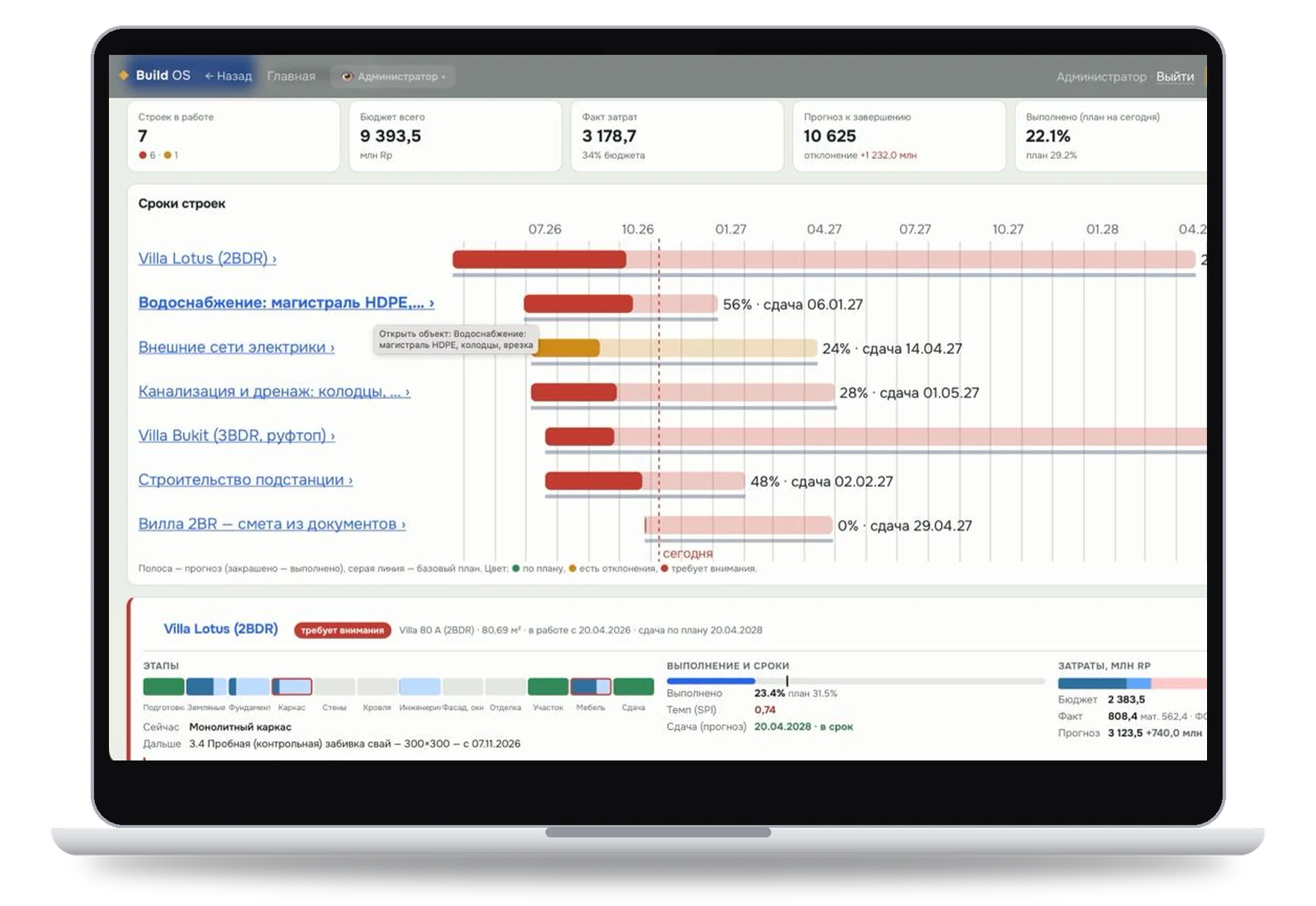

Construction and installation: the unit of accounting is the project. Same number of modules, named in the industry’s language.
Manufacturing: the unit of accounting is the order or batch. Same number of modules, named in the industry’s language.
Trade: the unit of accounting is the request or shipment. Same number of modules, named in the industry’s language.
Services: the unit of accounting is the contract or project. Same number of modules, named in the industry’s language.
Documentation
Contracts, letters, certificates
Projects and estimates
Works and price database
Work schedule
Plan, actual, forecast
Purchasing
Tenders, orders, invoices
Warehouse
Receipts and issues
Inventory
Tools, equipment
Timesheets and payroll
Crews and engineering staff
Accounting and finance
Costs, plan vs actual
Tasks and chat
Question → task
Dashboards
Director, client
AI in modules
Calculation, analysis, hints
AI workspace
Employee workspace
Documentation
Contracts, drawings, sign-offs
Orders and process sheets
Specifications and standards
Production plan
Capacity, order deadlines
Purchasing
Raw materials, components
Warehouse
Raw materials and finished goods
Equipment
Machines, tooling, repairs
Timesheets and output
Shifts, piecework, payroll
Cost
Product: plan vs actual
Tasks and chat
Shop-floor question → task
Dashboards
Director, foreman, customer
AI in modules
Specification and quote from a drawing
AI workspace
Process engineer, purchasing, QC
Documentation
Contracts, invoices, delivery notes
Catalog and prices
Products, price lists, discounts
Requests and deals
From inquiry to shipment
Purchasing
Suppliers, orders, lead times
Warehouse
Stock, reservations, shipments
Delivery
Trips, vehicles, statuses
Sales team
Targets, bonuses, payroll
Profit and finance
Deal, client, manager
Tasks and chat
Client request → task
Dashboards
Director, manager, client
AI in modules
Item matching and quotes
AI workspace
Manager workspace
Documentation
Contracts, sign-offs, reports
Projects and pricing
Scope of work, rates, price
Plan and stages
Deadlines, milestones, workload
Subcontracting
Contractors, orders, invoices
Knowledge base
Templates, procedures, solutions
Resources
Licenses, equipment, access
Hours and payroll
Timesheets by project
Profit and finance
Hours vs contract price
Tasks and chat
Client request → task
Dashboards
Director, client
AI in modules
Contract, sign-off, report
AI workspace
Specialist workspace
Modules are named in your industry’s language: site, order, batch or project.
An engineering company in Russia and a contractor in Bali both work in this system.
MaxArts Lab is the team of Maxim Novikov, owner of ESM Group. We run a contracting company ourselves and know how a buyer, an estimator, a lawyer and a foreman work. That is why building a system for your business takes weeks, not years.
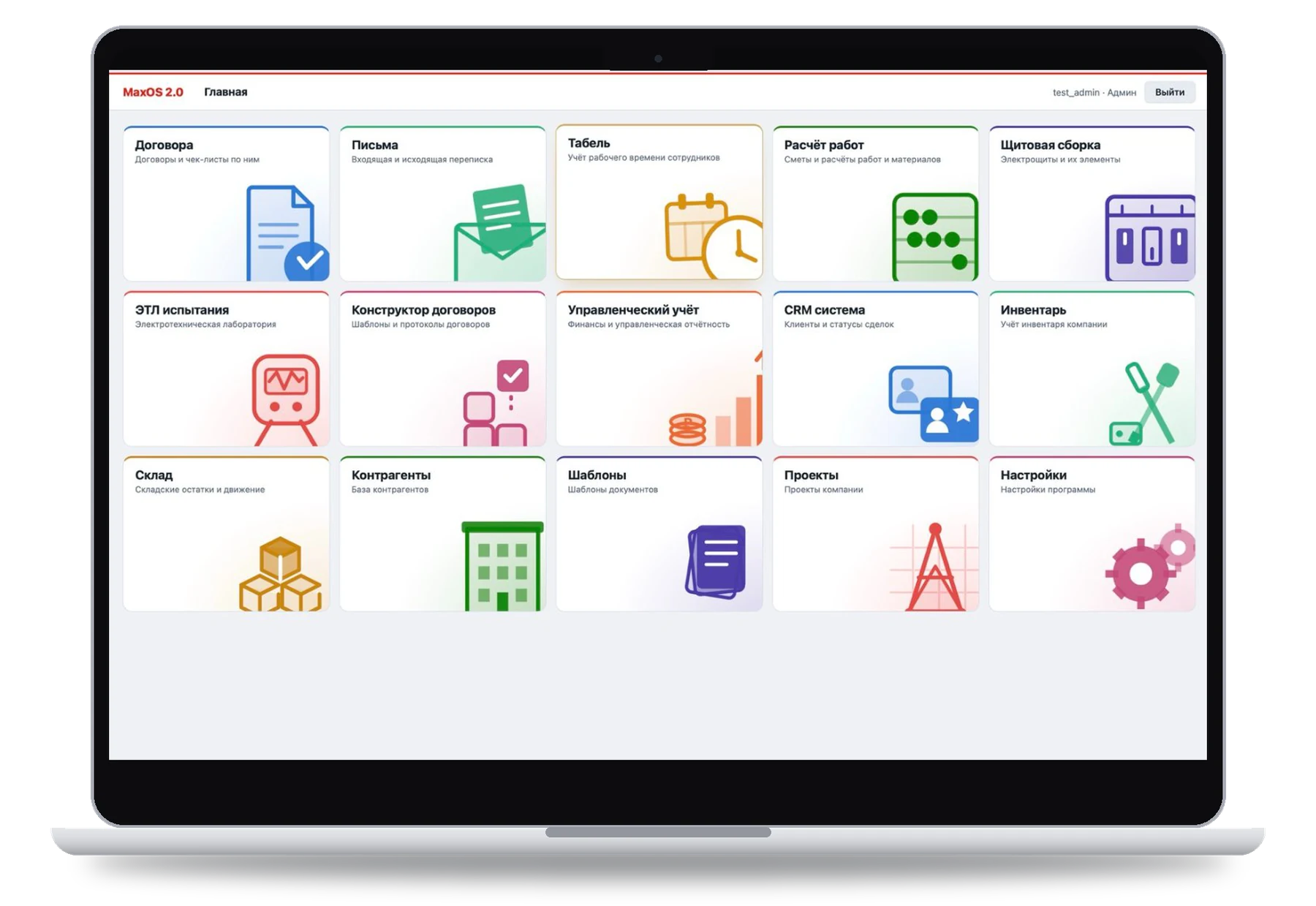
On screen: MaxOS 2.0, ESM Group’s internal system that Build OS grew out of.
Cost, revenue and the metrics you actually need.
We keep the ones you need, drop the rest and name them in your industry’s language.
Into the modules, on your data. For employees, workspaces with a knowledge base.
A site, workshop, store or department.
Step 1. It stays with you no matter what.
Steps 2–4 in one area. Results measured in hours and money.
At your pace. That is how our own system grew over ten years.
| Criterion | Assembled from ready-made modules | Off-the-shelf product | Custom development |
|---|---|---|---|
| Where it starts | with a business map in a week | with buying licences | with a technical specification |
| First result | in 2–4 weeks | fast, within what the product does | from one month |
| Your processes | fitted to you: we name and configure the modules | the business adapts to the software | fully tailored to you |
| AI on company data | built into the modules | depends on the product | a separate project |
| Main risk | limited to one area | paying for what you don’t use | time and budget grow along the way |
Runs in the browser over a secure connection. Other hosting options are discussed at step 1.
Everyone sees only their own part: director, purchasing, warehouse, foreman, client.
A daily database backup.
In the AI workspace every employee has their own files and history.
Claude and GPT. Russian models such as GigaChat and YandexGPT can be connected.
AI suggests, an employee confirms. Every price in a calculation has a source and a date.
Management does not read employees’ AI chats: the analytics show only the score.
Did not find your question? Message us on Telegram, we reply within one business day.
Ask on Telegram →They stay. accounting software keeps the books, the system handles orders, projects and costs. Data exchange can be set up on request.
That is why it doesn’t decide on its own: it calculates from your database, flags anything questionable, and a person confirms.
We start with one area and one task. The analytics show who needs help.
The first step is one week with a fixed scope. After that you decide based on the result.
A team does the work, not one person. The business map and documentation stay with you.
On Telegram to Maxim Novikov: @MaxArt_s or to the company bot: @MaxArtsLab_bot. Or leave a request in the form.
You tell us how the business works and where it hurts today.
A description of your business, the module set and a launch plan.